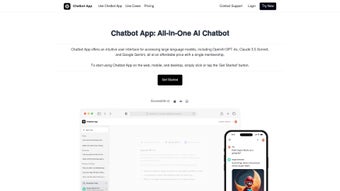

Download Chatbot App – AI chatbot builder, no‑code, secure
Overview
Chatbot App is a fully cloud‑based, no‑code platform that enables anyone—from solo entrepreneurs launching a first‑time online store to large enterprises handling thousands of daily support tickets—to design, manage, and deploy AI‑driven conversational agents in a matter of minutes. The service runs on a lightweight JSON architecture that streamlines data exchange, making integration with websites, mobile applications, and popular messaging services as simple as copying a short snippet of JavaScript or pasting a generated link. This architectural choice not only reduces the learning curve for non‑technical users but also provides developers with a clean, version‑controlled representation of the entire bot logic, which can be stored in Git repositories or shared across teams for collaborative editing.
The core value proposition of Chatbot App lies in its ability to deliver personalized, 24/7 customer support that can answer common inquiries, guide users through complex workflows, and collect valuable feedback for continuous improvement. By automating routine interactions, businesses free up human agents to focus on higher‑value tasks such as problem resolution and upselling, ultimately improving response times and boosting overall customer satisfaction. Security is baked into every layer of the platform: end‑to‑end TLS 1.3 encryption protects data in transit, role‑based access controls limit who can view or edit bot configurations, and GDPR‑compliant storage ensures that personal data is handled responsibly.
Whether you need a simple FAQ bot for a small e‑commerce shop or an advanced virtual assistant capable of handling multi‑step transactions for a multinational contact center, Chatbot App scales with your needs, offering a flexible, intuitive interface that dramatically reduces both development time and cost compared with traditional chatbot development pipelines.
Key Features
The feature set of Chatbot App is designed to cover every stage of the chatbot lifecycle, from initial concept to live production and ongoing optimization. Below is a comprehensive list of capabilities that make the platform stand out in a crowded market. Each feature has been crafted to address real‑world business challenges, ensuring that you can focus on delivering value to your customers rather than wrestling with technical details.
- No‑code chatbot builder: Drag‑and‑drop widgets let you design conversational flows without programming knowledge.
- JSON‑based data model: Export and import chatbot logic as clean JSON files for version control or offline editing.
- Multi‑channel deployment: Publish bots instantly to websites, Facebook Messenger, WhatsApp, Slack, and mobile apps (iOS & Android).
- AI‑powered natural language understanding: Powered by state‑of‑the‑art language models that interpret user intent with high accuracy.
- 24/7 automated support: Handles unlimited concurrent conversations, reducing wait times and operational costs.
- Personalization engine: Leverages user data to deliver tailored responses, upsell offers, and dynamic FAQs.
- Robust analytics dashboard: Real‑time metrics on engagement, satisfaction scores, and conversation paths help you iterate quickly.
- Secure data handling: TLS encryption, role‑based permissions, and GDPR‑compliant data storage keep information safe.
- Integration ready: Connects with CRM, ticketing, and marketing platforms via webhooks or REST APIs.
- Scalable pricing model: Starts free for small projects with optional paid tiers for advanced features and higher volume.
In addition to the core capabilities listed above, Chatbot App continuously evolves through regular updates that improve language understanding, add new channel connectors, and introduce advanced analytics widgets. The platform also offers a marketplace of pre‑built templates for common use cases such as lead qualification, order tracking, and appointment scheduling, allowing you to jump‑start a project with proven conversational patterns. For teams that require deeper customisation, the JSON export can be edited manually or processed through external scripts, giving you the flexibility to blend low‑code convenience with high‑code control when needed.
Installation & Usage Instructions
Getting Started – Account Creation
Visit ChatbotApp.com and click the “Sign Up” button. The registration process is straightforward: provide an email address, set a secure password, and verify your account through the confirmation link. Once logged in, you’ll land on the dashboard where you can create your first bot by selecting “New Bot” and naming it according to its purpose (e.g., “SupportBot” or “SalesAssistant”). The onboarding wizard then guides you through a brief set‑up questionnaire that captures the primary use case, target audience, and preferred deployment channels. This information helps the platform suggest default intents and response templates, speeding up the initial build phase.
Designing Your Bot – No‑Code Workflow
The visual builder opens with a blank canvas. Use the left‑hand panel to drag nodes such as “User Input”, “AI Intent”, “Condition”, and “Response”. Connect these nodes to define the conversation flow.
For each “AI Intent” node, you can type sample phrases that your customers might use; the platform’s AI automatically learns from these examples and refines its classification model in the background. When you add a “Response” node, you can choose between plain text, rich media cards, quick‑reply buttons, or even embed video clips. Advanced nodes let you call external APIs, update CRM records, or trigger webhook events, enabling you to build end‑to‑end business processes without writing code.
Testing & Publishing
Before going live, click the “Preview” button to simulate real‑time interactions. The test console shows both user input and bot replies, allowing you to tweak intents or responses instantly. You can also invite team members to a shared testing session, where each participant sees the same conversation log and can leave comments directly on the flow diagram.
When you’re satisfied, press “Publish”. You’ll receive a unique embed code (JavaScript snippet) for web integration or a direct link for messaging platforms. Paste the snippet into your website’s HTML before the closing tag, or follow the platform‑specific steps for Messenger, Slack, or WhatsApp.
For mobile apps, the generated code can be placed inside a WebView component, making the bot appear as a native feature without additional SDKs.
Maintenance & Updates
Chatbot App continuously improves its AI models, delivering automatic updates to language understanding without any action required from you. However, you should regularly review analytics, add new intents, and update responses to keep the bot relevant. The platform also offers version control; each major edit can be saved as a new version, enabling rollback if needed. For enterprises with strict change‑management policies, you can schedule deployments to a staging environment first, run a set of automated regression tests, and then promote the bot to production with a single click.
Finally, the platform includes a built‑in notification system that alerts you via email or Slack whenever a conversation triggers a predefined escalation rule (for example, when a user asks for a refund). This ensures that critical issues are routed to human agents promptly, preserving the seamless experience that customers expect from modern digital support channels.
Compatibility, Pros & Cons
Because Chatbot App is fully cloud‑based, it works on any modern browser—Chrome, Firefox, Edge, Safari—across Windows, macOS, Linux, as well as mobile browsers on iOS and Android. The generated bots are platform‑agnostic: they run seamlessly on web pages, native mobile apps (via WebView), and popular messaging services. No additional software installation is required on the client side, making it a truly universal solution that can be adopted by teams with diverse technology stacks.
Pros
- Zero‑code development accelerates time‑to‑market, allowing you to launch a functional bot in hours rather than weeks.
- JSON export/import enables easy backup, collaborative editing, and integration with existing development pipelines.
- AI‑driven natural language understanding delivers high accuracy out of the box, reducing the need for manual intent mapping.
- Multi‑channel publishing saves the effort of building separate bots for each platform, ensuring a consistent brand voice.
- Comprehensive analytics provide actionable insights for continuous improvement and ROI tracking.
- Strong security measures protect sensitive customer data and help meet regulatory compliance.
- Free tier allows testing without financial commitment, making it low‑risk for startups and small teams.
Cons
- Advanced customization (e.g., custom NLP models or proprietary machine‑learning pipelines) requires a higher‑tier plan.
- Heavy reliance on internet connectivity; offline usage is not supported, which may limit deployment in low‑bandwidth environments.
- Complex conversation trees can become difficult to manage without proper naming conventions and documentation.
- Limited native mobile SDKs; integration relies on web‑view embedding, which may not meet all native performance expectations.
- While the platform offers many integrations, some niche enterprise systems may still require custom middleware.
Conclusion & Call to Action
In a world where instant, personalized communication has become the norm, Chatbot App delivers a powerful, secure, and truly no‑code solution for building AI chatbots that can scale with any business. Its JSON backbone ensures flexibility for developers, while the intuitive visual builder lowers the barrier to entry for non‑technical teams. With robust analytics, multi‑channel support, and strict data protection measures, you can confidently deploy bots that enhance customer experience, reduce operational overhead, and free up human agents for higher‑value interactions. The platform’s free tier makes it easy to experiment, and the clear upgrade path ensures that you can grow without hitting a hard ceiling.
Ready to automate your customer interactions and boost satisfaction? Download Chatbot App now and start building your first chatbot in minutes—no coding required. Whether you are looking to handle routine FAQs, capture leads, or provide complex transactional assistance, Chatbot App gives you the tools to deliver a seamless conversational experience across web, mobile, and messaging channels.
Frequently Asked Questions
Is Chatbot App really free to use?
Yes, Chatbot App offers a free tier that includes unlimited bots, basic AI intent recognition, and up to 500 monthly active users. Paid plans unlock advanced features such as custom integrations, higher usage limits, and priority support.
Can I export my chatbot data?
Absolutely. All bots can be exported as JSON files, which contain the entire conversation flow, intents, and response content. This makes version control and migration to other platforms straightforward.
How secure is the platform for handling customer data?
Chatbot App uses TLS 1.3 encryption for data in transit and stores all user data on GDPR‑compliant servers. Role‑based access controls let you define who can view or edit bot configurations, and audit logs track every change.
Do I need any technical knowledge to create a bot?
No programming skills are required. The drag‑and‑drop interface guides you through building conversational paths, and the AI engine handles intent detection automatically. However, a basic understanding of your business processes helps in designing effective flows.
Can the chatbot be integrated with my existing CRM?
Yes. Chatbot App provides webhooks and a REST API that can push conversation data into popular CRMs such as Salesforce, HubSpot, or Zoho. You can also pull customer records to personalize responses in real time.
Chatbot App stands out for its ease of use, strong security, and cross‑platform reach. While power users may miss deep custom NLP capabilities, the platform’s free tier and rapid deployment make it an excellent choice for businesses looking to modernize support without heavy development costs.



.png)



